Challenge Response Type
response: challenge serves an interstitial (a CAPTCHA-style proof-of-effort page) when a plugin matches, instead of rejecting the request outright. A visitor who solves the challenge is issued an HMAC-signed pass token that short-circuits any future response: challenge plugin served by the same provider, until the token expires.
The pass token is:
- Signed with the configured
challenge.secret(HMAC-SHA256) so it cannot be forged. - IP-bound — the token only verifies for the same client IP that solved the challenge.
- Audience-bound — the token carries an
audclaim and only verifies against the instance that issued it. See Scoping tokens across instances. - Provider-bound — the token carries a
prvclaim and only satisfies rules served by the provider that issued it. See Per-plugin providers. - Delivered two ways — as an
HttpOnly; Secure; SameSite=Strictcookie and as a value the interstitial JS writes tolocalStorageso SPA callers can attach it to XHRs via a custom header (defaults toX-Firewall-Challenge). - Expires after
metadata.default_expiration_timeseconds for the matched plugin, falling back tochallenge.ttland then to3600. See How long a pass lasts.
Setting one up for the first time?
This page is the reference — how the pass token works, what each provider costs you, and the interface to write your own. To just get a challenge running, start with Add a Challenge.
How long a pass lasts
challenge:
  provider: math
  secret: '%env(FIREWALL_CHALLENGE_SECRET)%'
  ttl: 3600     # the default for rules that name no lifetime, and the ceiling for every rule
| Where the number comes from | metadata.default_expiration_time → challenge.ttl → 3600 |
A rule asking for more than challenge.ttl | Clamped to it, and logged at warning when the rule fires |
| A lifetime posted back by the interstitial | Clamped to the same ceiling |
| A lifetime below the ceiling | Honoured — asking for less is asking for less exposure |
The cookie and the token always carry the same lifetime. A cookie outliving its token means a visitor sending something the firewall rejects with no way to tell why.
The client does not choose it
The lifetime has to travel with the visitor, because the submission arrives at challenge.path rather than at the protected URL — by then nothing in the request says which rule sent them, so metadata.default_expiration_time is not knowable. That is why it rides in the interstitial, and why the fix was never "stop reading it".
As of 2.32.0 it rides in the signed provider_token instead of the form field beside it:
challenge_provider = math|900.k8Hs3...        ← signed; this is what decides
ttl                = 900                       ← still rendered, no longer believed
So the number the firewall resolved survives the round trip without the client being asked for it. challenge.ttl still clamps what comes back, because the ceiling may have been lowered while the page was open — a ceiling that applied only to values the client sent would be a ceiling with a gap in it.
An interstitial rendered before 2.32.0 still works
Those carry the provider name alone, and are accepted for one minor: the posted ttl is used, clamped by challenge.ttl exactly as in 2.30.0 and 2.31.0. Without that, every visitor who happened to be mid-solve when the deploy landed would be refused.
The same fallback covers a custom provider that builds provider_token itself rather than echoing the one it was handed.
getRenderContext()['ttl'] is unchanged and still means what it meant — hosts rendering their own page in mode: exception read it.
Why it is a ceiling and not just a default
The lifetime is not known when a solution is verified. The submission arrives at challenge.path, not at the protected URL, so the rule that matched — and therefore its default_expiration_time — is long gone by then. That is why the value rides in the interstitial's form.
Which means it is posted by the client. Before challenge.ttl there was a floor under that value and no ceiling on it: solve one challenge, post ttl=999999999, and the pass token short-circuits every response: challenge rule served by that provider for the next thirty-one years. The token is HMAC-signed, so it is valid — the signature covers the lifetime the client asked for.
Two things follow that are worth knowing:
- Raising
challenge.ttlraises the ceiling for everything. A single rule needing a long pass sets the limit every other rule is measured against, because verification cannot tell them apart. If one route genuinely needs a day-long pass and the rest should not, give it its own instance with its ownaudience. - Tokens already issued are not revoked by lowering it. They are stateless and signed, so an outstanding long-lived pass stays valid until it expires — see Withdrawing a pass for the two levers that take one away without rotating the secret.
firewall-check --lint reports a challenge rule whose default_expiration_time exceeds challenge.ttl, so a rule that does not do what it says shows up in CI rather than one request at a time in a log.
Withdrawing a pass
A pass token is stateless and HMAC-signed, so once issued it is accepted until its own exp. That is the property the design is built on — no shared session store, horizontal scaling for free — and it means rotating challenge.secret was, until 2.30.0, the only way to stop one being accepted. It re-challenges every legitimate visitor holding a pass in order to withdraw one.
Two levers, both off by default. A deployment that never revokes anything should pay nothing for the ability.
A line in time: challenge.passes_valid_from
Every pass issued before that moment stops being accepted. One config value, no storage, nothing per token — which makes it the blunt-but-not-nuclear middle, and the right reach for the likeliest case: a long TTL was configured by mistake and noticed a week later.
It is compared against the token's iat claim, added in 2.30.0. A pass minted before that claim existed is withdrawn by any cutoff, because it cannot be dated — which is the right way round: the passes most worth withdrawing this way are exactly the ones issued before the firewall was fixed. Nothing changes for a deployment that never sets the key.
A value that cannot be read as a moment in time is a startup failure rather than a silent fallback to "off". An operator who set this believes outstanding passes were withdrawn.
One pass: challenge.revocable
$ bin/firewall-challenge firewall.yml --inspect=eyJpcCI6...
Pass token:
  address:  203.0.113.9
  provider: math
  issued:   2026-09-16 12:04:11 UTC
  expires:  2026-09-16 13:04:11 UTC
  nonce:    af2f100884fa35c3281b6d1db727b8fd

$ bin/firewall-challenge firewall.yml --revoke-nonce=af2f1008… --reason="abusing the pass"
Revoked af2f100884fa35c3281b6d1db727b8fd until 2026-09-16 13:04:11 UTC.
Keyed by the token's nonce, which the payload has always carried, so this reaches passes already in the wild. Records are written with the token's remaining lifetime and disappear when it would have expired anyway, so the list trims itself and is bounded by the longest TTL in play.
| Cost when off | Nothing. The store is never consulted |
| Cost when on | One storage read, and only on a token that has already passed every other check |
| Where it is stored | The same backend as the block list, under fw_challenge_revoked:, hashed |
| Getting the nonce | --inspect a token, or read pass_nonce off the Challenge solution accepted log line |
The Challenge solution accepted line carries pass_nonce and pass_expires for exactly this: grep it by address and you have what a revocation needs, without retrieving a token out of somebody's browser.
Revoking is not blocking
Blocking an address refuses a client. Revoking withdraws an exemption a client earned, which is the opposite direction and does not follow from it. bin/firewall-block is the other tool, and both read the real store.
$ bin/firewall-challenge firewall.yml [action] [options]

  --inspect=TOKEN    Decode a pass: address, provider, issued, expires, nonce
  --revoke=TOKEN     Withdraw that pass, until its own expiry
  --revoke-nonce=N   Withdraw by nonce, for when the log is what you have
  --restore=NONCE    Put a revoked pass back
  --status=NONCE     Whether a nonce is currently revoked, and why

  --expires=EPOCH    With --revoke-nonce: when the token expires. Defaults to
                     now plus `challenge.ttl`, which no live pass outlasts
  --reason=TEXT      Recorded alongside a revocation
  --json             Machine-readable output
Restoring is possible because the token was never changed — only the record saying to refuse it. That is also why --revoke cannot outlive the pass: a revocation is held for the token's remaining lifetime and no longer.
Single-use solutions
A stateless provider verifies a solution purely from the posted payload, so the same payload keeps verifying until it expires. For a proof-of-work challenge that quietly defeats the point: an attacker solves one challenge and hands the payload to as many clients as they like, each minting its own IP-bound pass token, and the per-solve cost is amortised to nothing.
Providers can opt out of that by implementing Kanopi\Firewall\Challenge\SingleUseSolutionInterface, which hands the firewall an identifier for the solution in the current request. The firewall records it in the configured storage backend and refuses any later submission carrying the same identifier. altcha implements this; a solved payload is accepted exactly once.
Two consequences worth knowing:
- The challenge flow now writes to storage. Records are small (one per solved challenge) and expire on their own when the underlying challenge would have gone stale. With
InMemoryStoragethey do not survive the process, so use a shared backend if you serve challenges from more than one worker. - The check is read-then-write, not atomic. Two submissions of the same solution arriving in the same instant can both succeed. This shrinks the reuse window from the full challenge lifetime to microseconds, which is the part that matters — the attack being closed is redistribution over seconds or minutes, not winning a race.
- A refused submission needs a fresh challenge, not a retry. The payload in the page is spent, so clicking Continue again re-posts something that cannot succeed. Every single-use provider therefore recovers on failure:
turnstileandrecaptchareset their widgets, which fetches a new token from the remote service.altchacannot do that — its challenge is embedded in the page, so resetting the widget re-solves the same one — and instead sends the visitor back to the page they wanted, which serves a new interstitial. If you write a single-use provider, give it asubmit_failuresnippet that does one or the other; without one, a single refusal locks the visitor out until they reload.
math deliberately does not implement it: its signed state is answer|expiry, and with only nine possible answers two visitors served in the same second routinely share one, so treating that value as single-use would reject legitimate solvers.
Per-plugin providers
challenge.provider sets the default. Any individual rule can override it with metadata.challenge_provider:
challenge:
  provider: math                # what every rule gets unless it says otherwise
  secret: '%env(FIREWALL_CHALLENGE_SECRET)%'
  provider_options:
    recaptcha:                  # keyed by provider name — see below
      site_key: '%env(RECAPTCHA_SITE_KEY)%'
      secret_key: '%env(RECAPTCHA_SECRET_KEY)%'

plugins:
  # A broad, low-confidence heuristic: a math question is proportionate.
  - plugin: "Kanopi\\Firewall\\Plugins\\Asn"
    response: challenge
    weight: -10
    config:
      - "asn:AS14618"

  # A high-confidence rule on a route that matters: worth the friction.
  - plugin: "Kanopi\\Firewall\\Plugins\\RateLimit"
    response: challenge
    weight: -20
    metadata:
      default_expiration_time: 900
      challenge_provider: recaptcha
    config:
      - "path@starts_with:/user/login|limit:5|window:60"
Different rules deserve different friction. A cheap math challenge suits a broad heuristic; brute force on a login path warrants something that costs a bot real money. Before this existed, choosing reCAPTCHA for one rule imposed a third-party round trip — and its privacy cost — on every other one too.
The value is a challenge.provider string: a built-in short name, or a FQCN implementing ChallengeProviderInterface. A plugin that names nothing gets challenge.provider, so existing configuration is unaffected.
Plugin classes can also name a provider in PHP by implementing Kanopi\Firewall\Challenge\ChallengeProviderAwareInterface. AbstractPluginBase already does, which is where the metadata key is read.
Options for more than one provider
With a single provider, provider_options was flat and all of it belonged to that provider. That still works. Once a plugin names a different provider, that provider needs its own block, keyed by name:
provider_options:
  turnstile:
    site_key: '%env(TURNSTILE_SITE_KEY)%'
    secret_key: '%env(TURNSTILE_SECRET_KEY)%'
  altcha:
    widget_src: /assets/altcha.min.js
    widget_integrity: 'sha384-…'
A block keyed by the provider's name always wins. A flat block is handed to challenge.provider only — a plugin-named provider gets nothing rather than another service's keys, since Turnstile's secret_key reaching reCAPTCHA would look configured right up until Google rejected every solution.
Every named provider is built at startup
A plugin naming a provider that cannot be resolved — a typo, a class that is not a provider, a remote provider whose site_key is missing — is a ConfigurationException from Firewall::create(), not a 500 for the first visitor to trip that rule. Both remote providers already refuse to construct without their key pair; warming them up at startup is what turns that into a startup failure.
The exception is a provider named only from PHP: it cannot be seen in configuration, so it is built when the plugin first matches and a bad name surfaces then.
One challenge per provider
Tokens are scoped strictly to the provider that issued them (see Scoping tokens). A client that trips two rules with different providers therefore solves two challenges and ends up holding two tokens, each opening only its own rule.
That is deliberate. The alternative — ranking providers so a "stronger" token covers a "weaker" rule — would mean the firewall imposing an ordering on services it does not control, and would leave custom providers with no place on the ladder. Order your rules by weight so the cheapest challenge a visitor can satisfy is the one they meet first.
Scoping tokens across instances
A pass token attests "this client solved a challenge" — so if two Firewall instances share a challenge.secret, they would accept each other's tokens without further scoping. That matters when the challenges differ in strength: a token earned on the trivial math challenge could otherwise be replayed against a route protected by altcha, and the weakest challenge in your deployment would set the effective security of every route that shares the secret.
Tokens therefore carry an aud claim, which defaults to the configured provider name and is covered by the signature. A math token will not verify against an altcha instance.
The same problem exists within one instance once rules use different providers, and aud cannot solve it — every rule in an instance shares one audience. Tokens therefore also carry a prv claim naming the provider that was actually solved, and a rule only accepts a token earned against its own provider. Both claims are covered by the signature, so neither can be re-scoped by its holder.
If you run the same provider in several places with the same secret — say a low-value public route and a sensitive admin area — the default audiences are identical, so set them apart explicitly:
challenge:
  provider: altcha
  secret: '%env(FIREWALL_CHALLENGE_SECRET)%'
  audience: admin-portal   # defaults to the provider name
The alternative is to give each instance its own challenge.secret, which isolates them just as effectively.
Upgrade note. Pass tokens minted before the
audclaim existed are rejected, because verification fails closed rather than treating a missing audience as a match. The visible effect is that everyone holding a live pass token is challenged once more after deploying. Tokens are short-lived (default one hour), so this clears on its own.A token minted before the
prvclaim existed is treated differently, and does not cost anyone a re-challenge: it can only have come fromchallenge.provider, so it is honoured for rules served by that provider and refused for every other one.
Built-in providers
Four providers ship with the firewall — set challenge.provider to a short name:
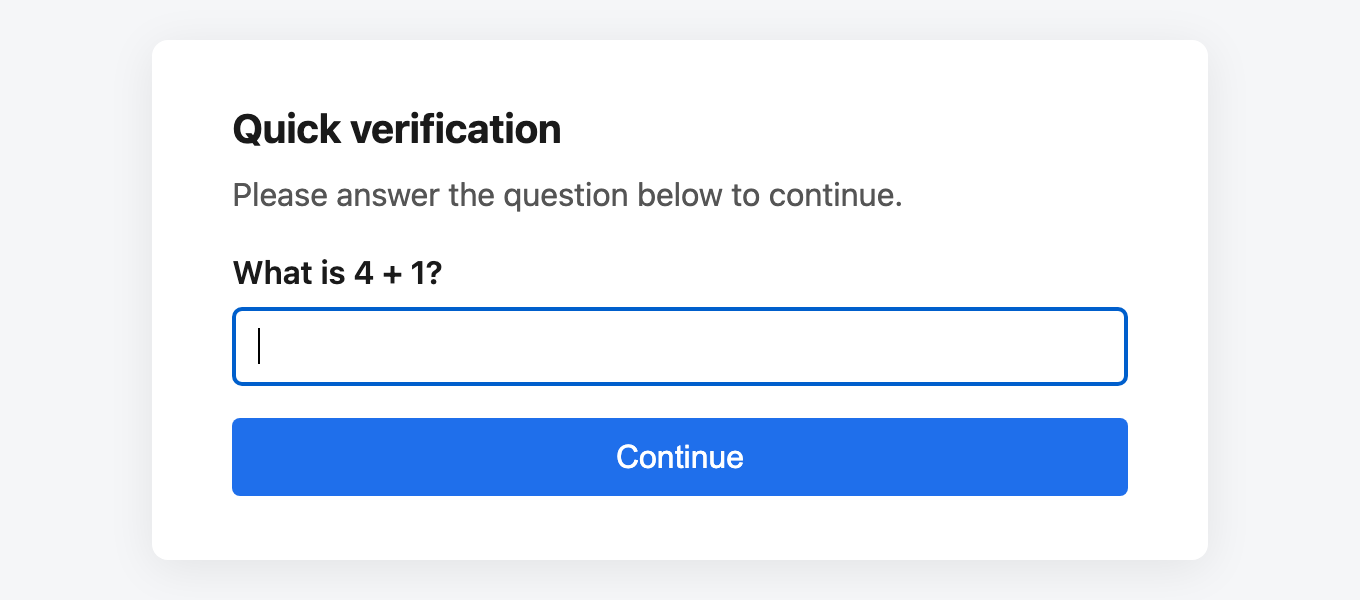
A single-digit addition question rendered server-side. Nothing loads from a third party, so it works under a restrictive CSP and adds no latency.
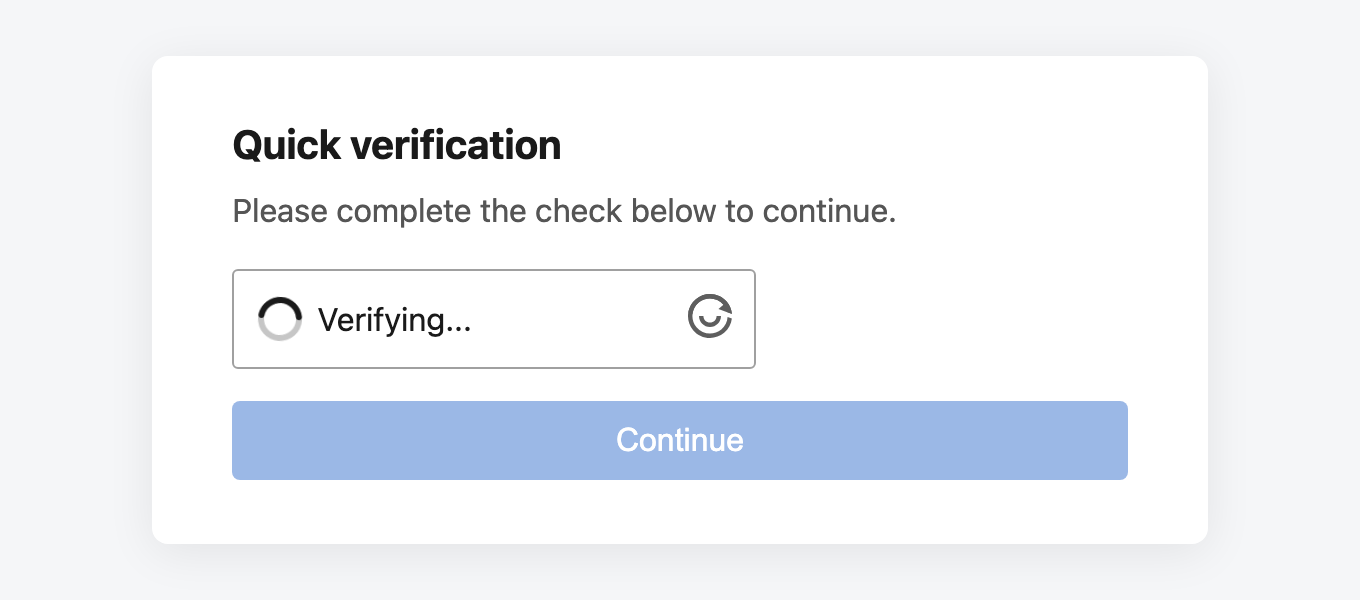
The ALTCHA widget solves a proof-of-work in the background and enables Continue on its own. The visitor clicks nothing; a bot pays CPU for every solve.
Cloudflare's Turnstile widget, verified server-side against their siteverify API. The strongest bot resistance of the four, and one of two that depend on a third party being reachable — from the visitor's browser and from your server.
Google's reCAPTCHA, in either the v2 "I'm not a robot" checkbox (the default) or the invisible, score-based v3. Verified server-side against Google's siteverify API.
The math and ALTCHA screenshots come from the demo application, which serves each provider on its own route.
Which to pick is mostly a question of what you are willing to depend on:
math | altcha | turnstile | recaptcha | |
|---|---|---|---|---|
| Third-party script | none | CDN (self-hostable) | Cloudflare only | Google only |
| Outbound call from your server | none | none | one per submission | one per submission |
| Subresource Integrity | n/a | yes, pinned | not possible | not possible |
| Bot resistance | lowest | CPU cost per solve | highest | high |
| Fails if the third party is down | n/a | interstitial degrades | nobody can pass (default) | nobody can pass (default) |
math— asks "What is A + B?" with single-digit operands. Low-friction proof-of-effort, no JS bundle, no external script load. Defeats the laziest bots; trivial for a human.altcha— embeds the ALTCHA v2 widget with a pre-computed challenge (no server round-trip to fetch one). The visitor's browser brute-forcesSHA-256(salt + N) == challenge; the salt embeds an expiry and the challenge is HMAC-signed withchallenge.secret, so the server stays stateless. Privacy-respecting, and imposes a per-solve CPU cost on bots. Solved challenges are single-use — see Single-use solutions.
The widget script is pinned to an exact version and served with a Subresource Integrity digest. To self-host it, or to serve it from a host your CSP already allows, set both options — supplying widget_src without widget_integrity emits no integrity attribute, since a digest that does not match the bytes would block the script entirely:
challenge:
  provider: altcha
  provider_options:
    widget_src: /assets/altcha.min.js
    widget_integrity: 'sha384-…'   # openssl dgst -sha384 -binary altcha.min.js | openssl base64 -A
The bundle is an ES module, so it is loaded with <script type="module">. If you host it yourself, keep that in mind: a classic script tag fails with Unexpected token 'export'.
turnstile— renders the Cloudflare Turnstile widget and verifies the token it produces against Cloudflare's siteverify API. Free and unmetered, and the widget adapts on its own from an invisible check to an interactive one based on how suspicious the client looks.
Create a widget in the Turnstile section of the Cloudflare dashboard, add the hostnames it may run on, and configure both keys:
challenge:
  provider: turnstile
  secret: '%env(FIREWALL_CHALLENGE_SECRET)%'     # pass-token HMAC key — NOT a Turnstile key
  provider_options:
    site_key: '%env(TURNSTILE_SITE_KEY)%'        # public; rendered into the page
    secret_key: '%env(TURNSTILE_SECRET_KEY)%'    # private; only ever sent to Cloudflare
Two names worth reading twice. challenge.secret signs pass tokens and has nothing to do with Cloudflare — it is still required. And despite looking like a pair, site_key is public while secret_key must never reach the browser; the provider never renders it.
Both keys are required. Omitting either throws ConfigurationException at startup rather than serving a widget every visitor would fail.
Optional settings:
| Option | Default | Purpose |
|---|---|---|
theme | auto | Widget colour scheme: auto, light or dark. |
timeout | 2 | Seconds to wait for siteverify, clamped to 1–10. |
on_error | block | What happens when siteverify cannot be reached — see below. |
send_remoteip | false | Forward the visitor's IP to Cloudflare. |
widget_src | Cloudflare's URL | Override to serve the bundle through a first-party proxy. |
When Cloudflare cannot be reached, the default is to refuse the submission. A verdict you could not obtain is not a pass, and failing open would turn any disruption of siteverify — an outage, a DNS failure, egress filtering on your host — into a bypass for every challenged route, available to anyone who can cause it. The cost of that choice is real, though: while siteverify is unreachable, challenged routes are impassable. Set on_error: allow if you would rather absorb the risk than lock visitors out. It only governs unreachability — a token Cloudflare actively rejects is always refused.
send_remoteip is off for a reason. Forwarding the client IP sharpens Cloudflare's signal, but getClientIp() is only trustworthy when global.require_trusted_proxies is configured. Behind an unconfigured proxy it returns whatever X-Forwarded-For claimed, so a spoofed header sends Cloudflare an address unrelated to the visitor and can fail verification for legitimate people. Turn it on only once your proxy configuration is right.
Two limitations to plan around. Cloudflare serves the widget from an unversioned, mutable URL, so unlike altcha there is no Subresource Integrity digest to pin — a digest would block the script the first time Cloudflare ships a change. And your Content-Security-Policy needs Cloudflare in two directives:
Replay needs no configuration: Cloudflare answers timeout-or-duplicate to a token that has already been validated, so a solve cannot be redistributed. That is why this provider does not implement SingleUseSolutionInterface or touch storage at all.
For local development, Cloudflare publishes dummy keys — 1x00000000000000000000AA with secret 1x0000000000000000000000000000000AA always passes. The siteverify call still goes over the network, so they do not make the flow work offline.
recaptcha— renders a Google reCAPTCHA widget and verifies the token it produces against Google's siteverify API. Shares its shape withturnstile; the differences are that it offers two incompatible versions and that one of them returns a score rather than a verdict.
Create a site at google.com/recaptcha/admin, pick the version there, add the domains it may run on, and configure both keys:
challenge:
  provider: recaptcha
  secret: '%env(FIREWALL_CHALLENGE_SECRET)%'     # pass-token HMAC key — NOT a reCAPTCHA key
  provider_options:
    site_key: '%env(RECAPTCHA_SITE_KEY)%'        # public; rendered into the page
    secret_key: '%env(RECAPTCHA_SECRET_KEY)%'    # private; only ever sent to Google
As with Turnstile: challenge.secret signs pass tokens and has nothing to do with Google, and despite looking like a pair, site_key is public while secret_key must never reach the browser. Both keys are required; omitting either throws ConfigurationException at startup.
The keys and the version must agree. A v2 key pair registered at Google returns no score, and a v3 pair does not render a checkbox. The provider refuses a scoreless response on version: v3 rather than treating "well-formed token" as "trustworthy visitor", and logs it at error with a hint — that message means the keys are v2.
Optional settings:
| Option | Default | Applies to | Purpose |
|---|---|---|---|
version | v2 | both | v2 (checkbox) or v3 (invisible, scored). |
theme | light | v2 | Widget colour scheme: light or dark. reCAPTCHA has no auto. |
size | normal | v2 | normal or compact. |
min_score | 0.5 | v3 | Lowest score that passes, 0.0–1.0. Clamped into range. |
action | firewall | v3 | Action name minted and required back. See below. |
timeout | 2 | both | Seconds to wait for siteverify, clamped to 1–10. |
on_error | block | both | What happens when siteverify cannot be reached. |
send_remoteip | false | both | Forward the visitor's IP to Google. |
use_recaptcha_net | false | both | Serve and verify via www.recaptcha.net instead of www.google.com, for networks where google.com is blocked. Moves both halves together. |
widget_src | Google's URL | both | Override to serve the bundle through a first-party proxy. On v3 the render parameter is appended unless the URL already has one. |
on_error and send_remoteip behave exactly as they do for turnstile, and for the same reasons — read those two paragraphs above; they apply here unchanged.
Prefer v2 unless you have a reason not to. v3 never asks the visitor for anything, which sounds strictly better and is not: success: true on v3 only means the token was well-formed and unspent, and the actual accept/reject is your min_score threshold. A human who scores below it has no puzzle to solve and no retry that helps — they simply cannot reach the route. Pick the threshold from observed traffic rather than from the 0.5 in Google's documentation, and think twice before putting v3 in front of anything real people need.
action is a security control on v3, not a label. A v3 token is minted by the site key, not by a page, so without binding it to an action a token produced by any other reCAPTCHA v3 call on your site — a newsletter signup, a search box, anything an attacker can trigger without friction — would satisfy the firewall challenge too. The provider requires the action Google echoes back to equal the configured one. Google drops characters outside alphanumerics, slashes and underscores, so the configured value is filtered the same way before it is compared.
v2 and v3 instances sharing a challenge.secret need an explicit audience. The aud claim defaults to the challenge.provider config string, which is recaptcha for both versions — so a pass earned on a v3 route would open a v2 route, and a v3 pass is the weaker claim of the two. Set challenge.audience on at least one of them:
challenge:
  provider: recaptcha
  audience: recaptcha-v3   # keeps v3 passes out of v2-protected routes
  provider_options:
    version: v3
Content-Security-Policy needs Google in two directives, and one host more than you would expect — api.js bootstraps a second bundle from gstatic.com:
Substitute https://www.recaptcha.net for https://www.google.com if you set use_recaptcha_net.
Replay needs no configuration: Google answers timeout-or-duplicate to a token that has already been redeemed or has aged out, so a solve cannot be redistributed. That is why this provider does not implement SingleUseSolutionInterface or touch storage at all. Tokens also go stale about two minutes after they are minted — the interstitial handles that itself, via v2's expiry callback and a periodic re-execute on v3.
For local development, Google publishes test keys — site key 6LeIxAcTAAAAAJcZVRqyHh71UMIEGNQ_MXjiZKhI with secret 6LeIxAcTAAAAAGG-vFI1TnRWxMZNFuojJ4WifJWe always passes, and the widget renders with a visible testing warning. They are v2 only; there is no v3 test pair, and the siteverify call still goes over the network.
For hCaptcha or anything else, implement Kanopi\Firewall\Challenge\ChallengeProviderInterface and set challenge.provider to its FQCN.
Writing a custom provider
A provider owns both halves of the round-trip: rendering the interstitial, and verifying what comes back. Providers must be stateless — embed whatever you need to verify the answer in the interstitial itself (a hidden field, signed with the shared TokenManager) rather than storing a per-challenge record. That is what lets the firewall scale horizontally without a shared session store.
<?php

namespace App\Firewall;

use Kanopi\Firewall\Challenge\ChallengeProviderInterface;
use Symfony\Component\HttpFoundation\Request;

class HCaptchaProvider implements ChallengeProviderInterface
{
    // Parameters are matched by declared type: a TokenManager parameter
    // receives the shared HMAC manager, an array parameter receives
    // challenge.provider_options. Declare only what you need.
    public function __construct(private readonly array $options = [])
    {
    }

    public function getName(): string
    {
        return 'hcaptcha';
    }

    public function renderInterstitial(Request $request, array $context): string
    {
        // $context carries: submit_url, redirect_to, ttl, cookie_name,
        // header_name, provider_token.
        // Echo redirect_to, ttl and provider_token back as hidden fields — the
        // Firewall reads them off the POST to size and target the pass token,
        // and to know which provider is being answered.
        $siteKey = htmlspecialchars($this->options['site_key'], ENT_QUOTES, 'UTF-8');
        $submitUrl = htmlspecialchars($context['submit_url'], ENT_QUOTES, 'UTF-8');
        $redirectTo = htmlspecialchars($context['redirect_to'], ENT_QUOTES, 'UTF-8');
        $ttl = htmlspecialchars($context['ttl'], ENT_QUOTES, 'UTF-8');
        $provider = htmlspecialchars($context['provider_token'] ?? '', ENT_QUOTES, 'UTF-8');

        return <<<HTML
        <!DOCTYPE html>
        <html lang="en"><body>
          <form method="post" action="{$submitUrl}">
            <div class="h-captcha" data-sitekey="{$siteKey}"></div>
            <input type="hidden" name="redirect_to" value="{$redirectTo}">
            <input type="hidden" name="ttl" value="{$ttl}">
            <input type="hidden" name="challenge_provider" value="{$provider}">
            <button type="submit">Continue</button>
          </form>
          <script src="https://js.hcaptcha.com/1/api.js" async defer></script>
        </body></html>
        HTML;
    }

    public function verifySolution(Request $request): bool
    {
        // Read from the raw bag: InputBag::get() throws on a non-scalar, and
        // this method runs on attacker-controlled input.
        $token = $request->request->all()['h-captcha-response'] ?? '';

        // Verify server-side against the provider's siteverify endpoint.
        // Return FALSE on any failure — never throw.
        return is_string($token) && $token !== '' && $this->verifyWithHCaptcha($token);
    }
}
challenge:
  provider: "App\\Firewall\\HCaptchaProvider"
  secret: '%env(FIREWALL_CHALLENGE_SECRET)%'
  path: /_firewall/challenge
  provider_options:
    site_key: '%env(HCAPTCHA_SITE_KEY)%'
    secret_key: '%env(HCAPTCHA_SECRET_KEY)%'
For a fuller worked example of this shape — widget rendering, server-side verification, timeouts, and what to do when the remote service is unreachable — read TurnstileChallengeProvider.
Requirements and gotchas:
- Escape everything you interpolate.
redirect_tooriginates from the request URI. The built-in providers run every substitution throughInterstitialRenderer::escapeHtml(); do the same. Values landing inside a<script>block needescapeJs()instead — HTML entities are not decoded there. - Echo back
redirect_toandttlas form fields named exactly that.redirect_tois read from the POST to decide where to send the visitor.ttlis no longer read from it as of 2.32.0 — see below — but keep emitting it: it is still the value to render if your page shows a visitor how long their pass will last, and omitting it is one less thing to change if you ever buildprovider_tokenyourself. - Echo back
provider_tokentoo, in a hidden field namedchallenge_provider(ChallengeProviderInterface::PROVIDER_FIELD). It is a signedname|ttl.signaturetriple telling the submission handler which provider to verify with, and how long the pass it mints should last — the matched plugin is long gone by then.InterstitialRenderer::render()emits it for you from theprovider_tokenpart. Omitting it locks the visitor out if any rule names its own provider: the submission is verified bychallenge.providerinstead, and the pass token is scoped to that — so the rule that demanded the challenge refuses it and serves the same interstitial again, forever. It is safe to omit only when the global provider is the only one in play. verifySolution()must never throw. It runs on attacker-controlled input; returnfalsefor anything you don't like. Note that$request->request->get()raisesBadRequestExceptionon an array value, so read hostile fields off->all()instead.- Register via FQCN, not a short name.
challenge.providerresolvesmath,altcha,turnstileandrecaptchaas built-ins; everything else must be a loadable class implementing the interface, orcreate()throwsConfigurationException. - Declare the collaborators you want.
ChallengeProviderFactorymatches constructor parameters by declared type — aTokenManagerparameter gets the shared manager, anarrayparameter getschallenge.provider_options, and a provider needing neither can declare no constructor at all. Untyped parameters receive theTokenManager, so providers written against the older fixednew $class($tokenManager)signature keep working unchanged. - Use
$tokenManager->sign()/verifySignature()if you need tamper-proof state in the form. You do not need to mint the pass token — the Firewall does that onceverifySolution()returnstrue. - Reuse the shared interstitial via
InterstitialRenderer::render()rather than hand-rolling a document. It owns the submit JS, the two token-delivery paths, and the escaping rules those depend on. Providers whose solution is spent by an attempt must pass asubmit_failuresnippet — either resetting the widget, or sending the visitor back for a new challenge. See Single-use solutions.
How dispatch interacts with allow / block
| Visitor state | Result |
|---|---|
Matched by an allow plugin | Allowed (challenge skipped). |
| Holds a pass token earned against the matched rule's provider | Allowed. |
| Holds a pass token from a different provider | Challenged again — a token is worth only the challenge it was earned on. |
No token, matches a challenge plugin | Interstitial served; original URL is remembered for the post-success redirect. |
Matches a block plugin | Blocked, even if a valid pass token is held. |